📡
Input
Your TikTok LIVE
Gifts and combos, likes, followers, Super Fans, comments, shares, room joins, emotes and Fan Club level-ups.
Built for TikTok LIVE
Turn your LIVE into a MAGICAL experience
Built around creator growth and viewer fun, Magic gives you a huge range of settings and features to take your stream to the next level. Everything a creator needs so their viewers live and interact with every moment of the broadcast.
Magic by Loxhias — the app in action
Real recording of the app — dashboard, profiles, alerts and the Overlay Editor.
Works with
OBS Studio
TikTok LIVE Studio
Minecraft (Java)
Roblox
Clash Royale
Stream Deck
Under the hood
A complete and rock-solid system
Magic connects straight to your LIVE and captures every interaction as it happens, firing the events your audience loves most. Its connection layer is built to ride out drops, so you can stream without worrying about it.
🧠
Decision
Profile engine
Evaluates your rules on your own machine: who sent it, what they sent, how much and how many times. Switch profiles without reconnecting your LIVE.
⚡
Execution
Local server
Delivers alerts and overlays from your own PC, with no round trip through the internet. That's what makes the reaction land the moment the gift does.
🎬
Output
Your stream
Alerts and widgets in OBS or TikTok LIVE Studio, minigames, commands inside Minecraft, cards in Clash Royale, or your own phone.
Its own connection
The app opens its own connection to your LIVE. You don't depend on an outside service relaying the events, or on anyone else staying online.
With a backup
If the main route drops, there are alternates ready to hold the connection. A rough patch on the network doesn't take your show down with it.
Test without going live
The console injects a fake gift, follow or comment down the exact same path as a real one. You get everything dialed in before you open the LIVE.
Profile System
Actions and Events: the engine behind your LIVE
Actions are what happens. Events are when it happens. Build one profile per stream format and switch between them without reconnecting.
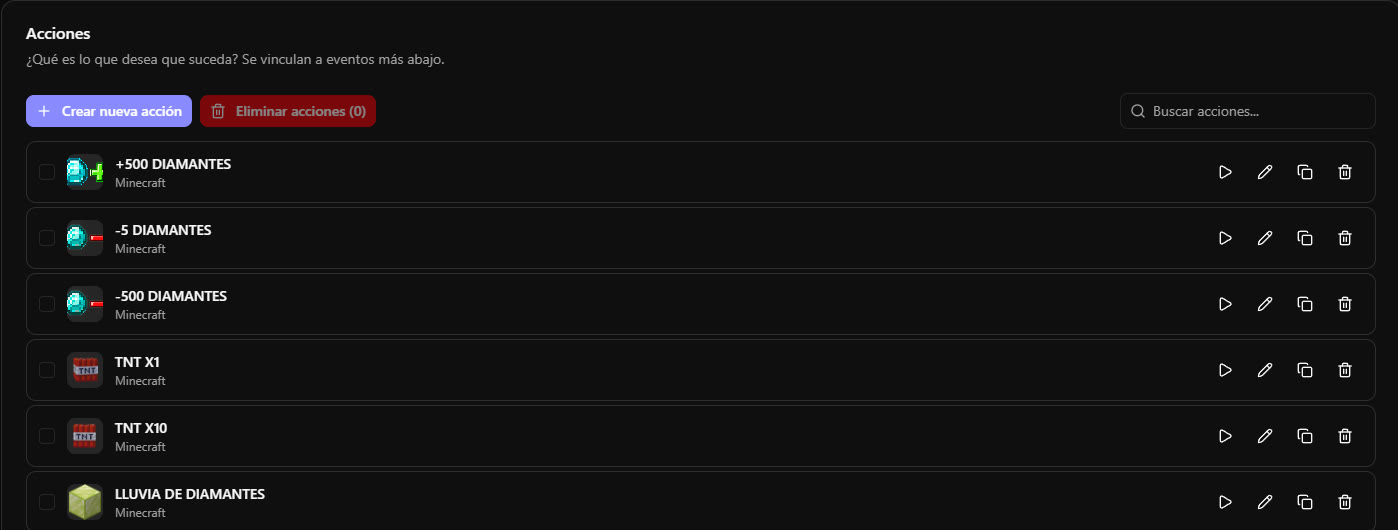
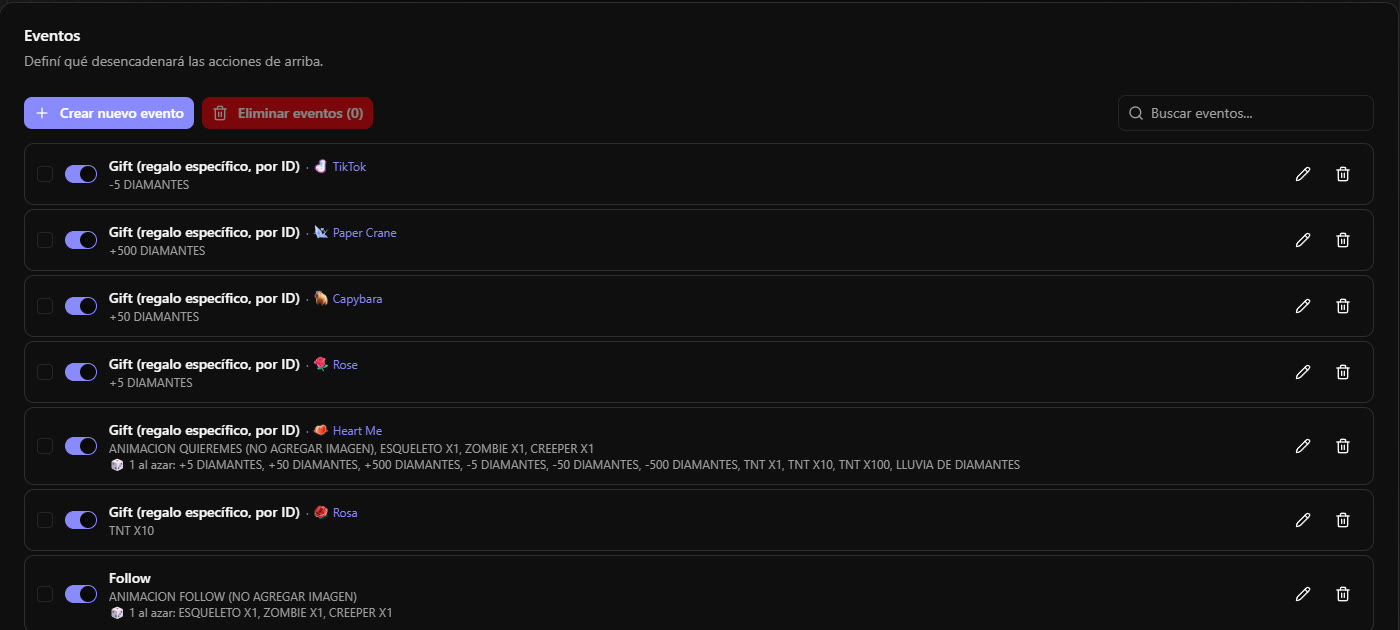
Every Event shows its trigger, the gift that fires it and which Actions it runs — including the ones picked at random.
The trigger understands context
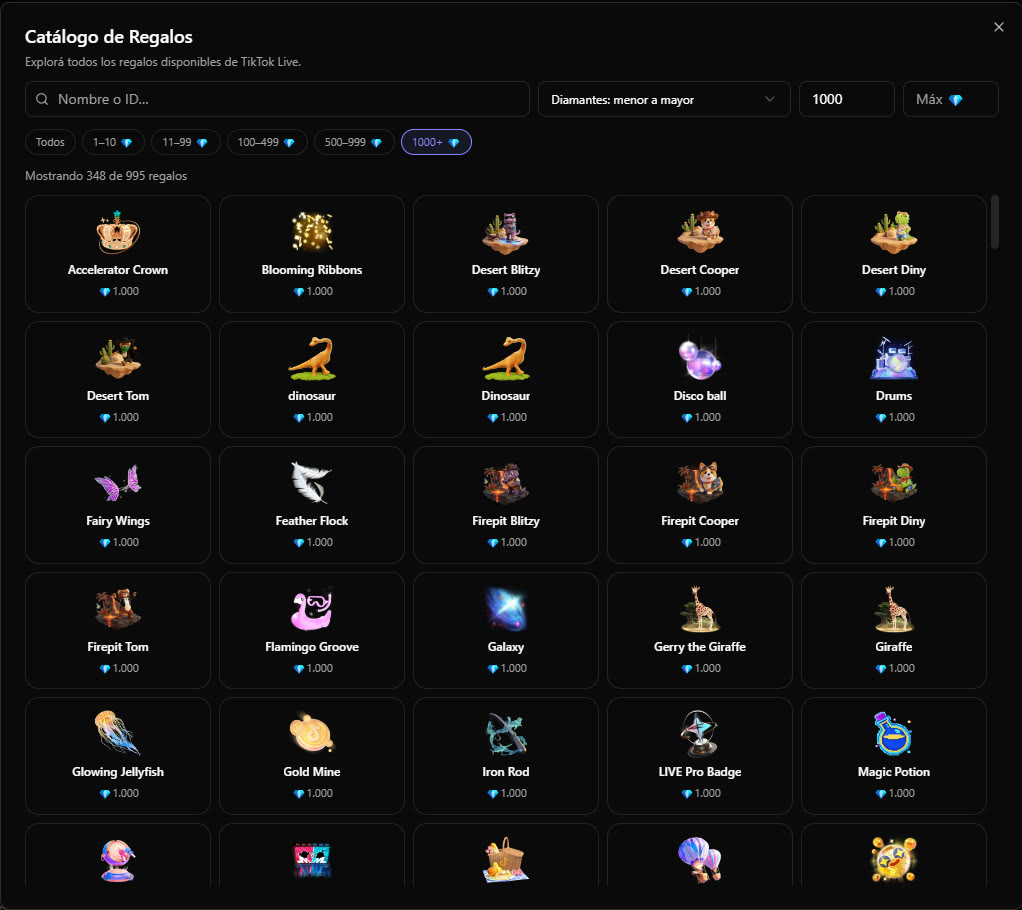
It's not just “someone sent a gift”: you pick the exact gift from your catalog or a minimum in diamonds, a keyword from chat, a Fan Club emote, a level-up. Then you filter who is allowed to fire it.
🎁
GiftsA specific one, a diamond minimum, or the raw ID
💬
ChatAny message, or only ones with your keyword
❤️
LikesTallied per viewer, with your own threshold
👤
Follow and Super FanWith a once-per-person limit
😀
EmotesFan Club ones, or one specific emote
⭐
Fan ClubWhen someone levels up
- ✓Audience filter: everyone, followers, Fan Club members by level, moderators, donors by level, the session's Top N gifters, or one specific viewer.
- ✓Combo control: 27 roses at once can fire 27 times, or just once every so many.
- ✓Random action: on top of the fixed ones, the event can run a different pick from a pool each time.
Professional Editor
Layered alerts, with a real timeline
You're not picking from four templates: you design the alert layer by layer, animate each one separately and set to the millisecond when it enters, how long it stays and how it goes.
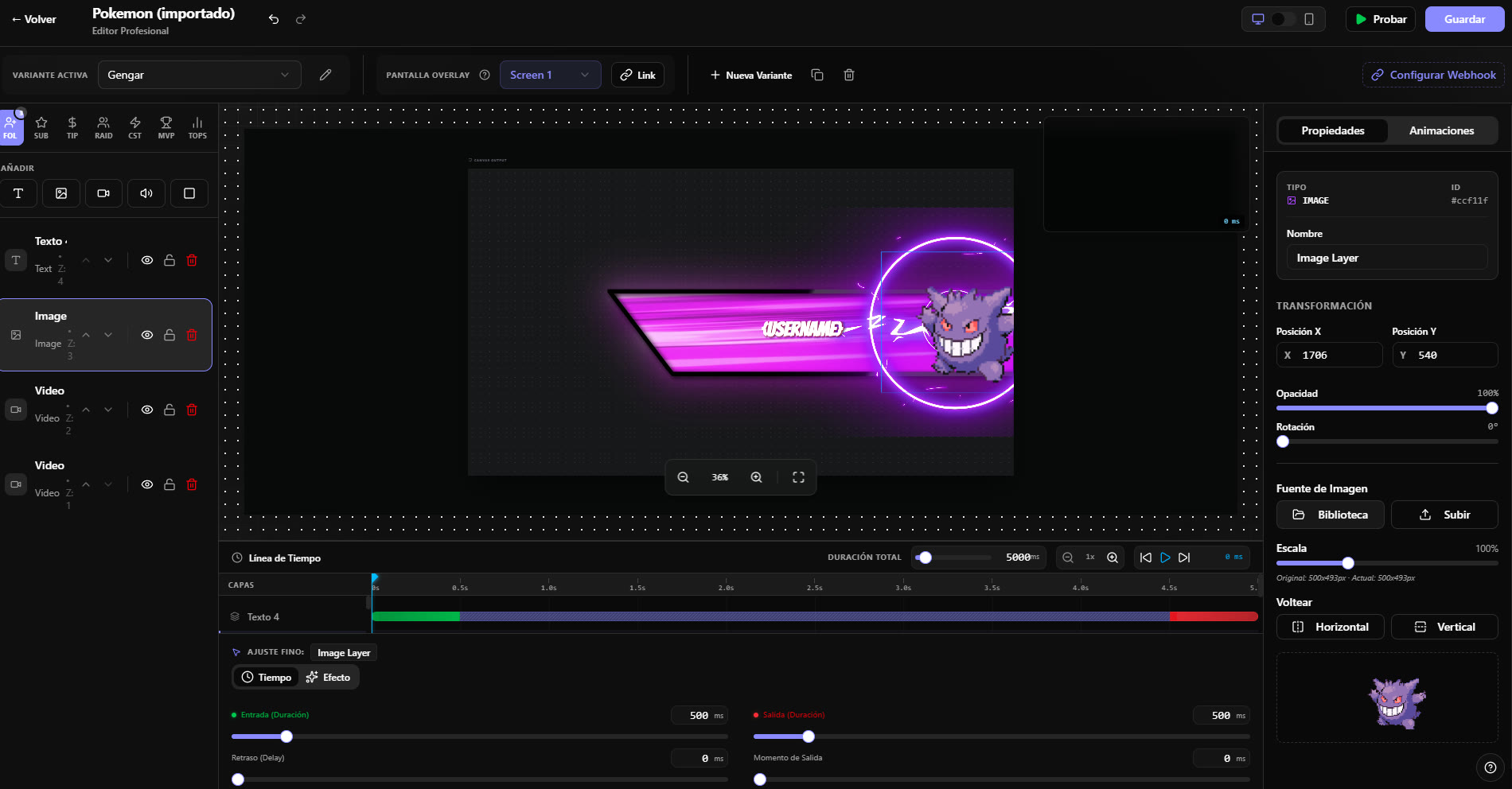
Animations with character
Pop In, exaggerated Zoom, Swoosh, Glitch, Bouncing Drop, axis Flip, Vortex… each with its matching exit.
Variants per alert
The same alert with different versions —one per gift or event type— and you choose which one is active.
Multiple screens
Split your alerts across separate overlay screens and send each one to its own source in OBS.
Chroma key and library
Knock the green background out of your videos inside the editor, and use the included image and video packs.
Overlay Editor
Your scene, in vertical format
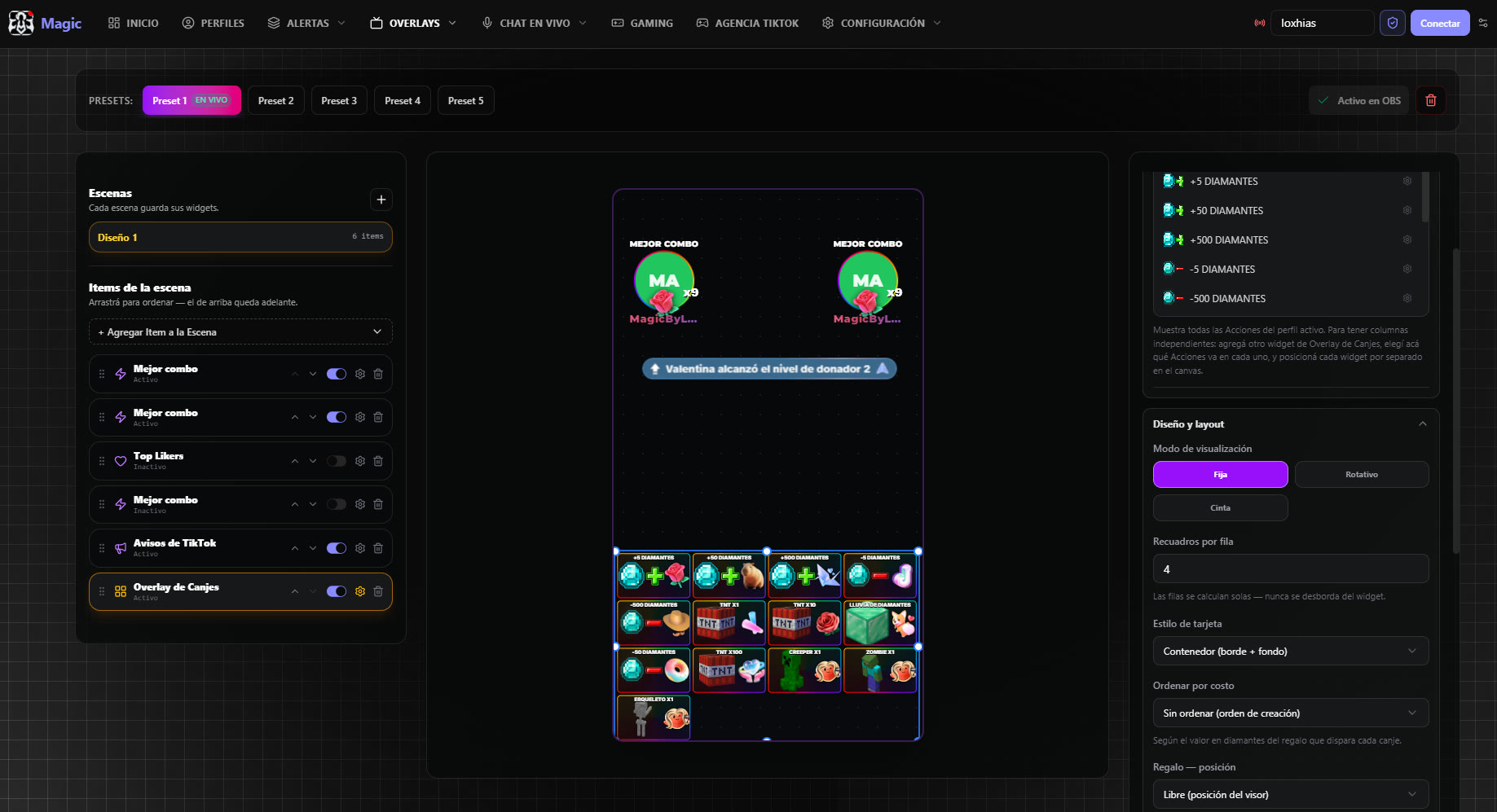
A canvas made for TikTok. Drag the widgets around, fine-tune every detail from the properties panel, save the scene into one of your presets and leave it live in OBS.
🏆
Top DonorsRanking with medals and avatars
❤️
Top LikersWho backs you hardest with likes
🎁
Best giftThe biggest gift of the LIVE
⚡
Best comboThe longest streak
💎
Diamond counterWith an optional goal
🏅
Wins counterGoes up from your own actions
🎡
Animated rouletteWith its pool and rarity weights
🎫
Redeem overlayWhich gift unlocks what
📣
TikTok noticesNew donors and level-ups
⏱️
Extensible timerThe real Timer, not a copy of it
🔔
Designed alertYour own alerts inside the scene
🎮
Minigame gridThe game inside the scene
- ✓Five presets: one scene for Minecraft, another for battles, another for just chatting — and you swap between them live.
- ✓Updates instantly: hit save and the overlay that's already on air changes by itself, with nothing to re-copy.
Beyond the editor
Overlays that run on their own
Standalone pieces you add to OBS separately, reacting to what happens on the LIVE just the same.
Extensible timer
A countdown that grows with the gifts: any Action can add, subtract, pause or reset the time. Two visual styles to pick from.
Goals and battles
A like goal on the real count, a team battle scoreboard that moves with the gifts, and image goals that reveal themselves as they fill.
Live chat and voice
Chat on screen with avatars, and a reader that speaks the comments and gifts out loud in natural voices while you play.
Game catalog
Games where your audience calls the shots
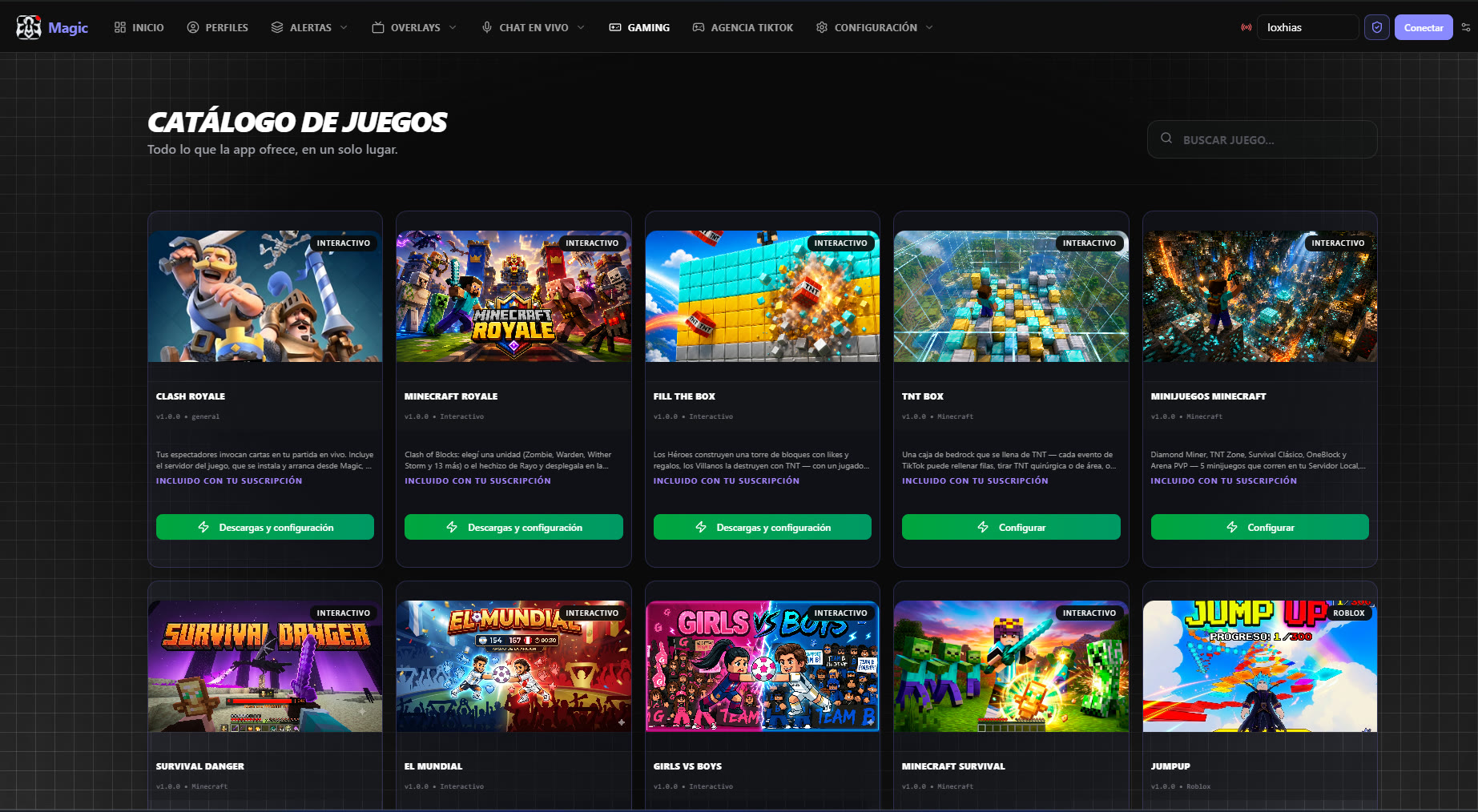
Everything the app offers, in one place — included with your subscription. Over your stream, inside Minecraft with our plugin, or in external games.
Minecraft and Clash Royale
Servers the app spins up for you
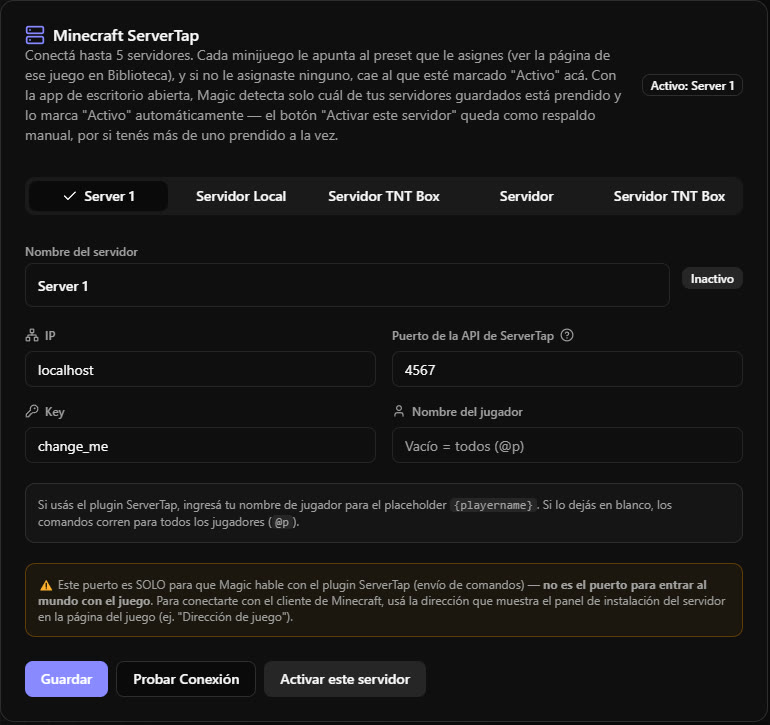
You don't need to know how to set up a server. Magic downloads, installs and starts the Minecraft one with our plugin, with its live console right inside the app. Clash Royale works the same way: the app handles it.
- ✓One-button setup: download, install and launch. No loose files, no config by hand.
- ✓Five minigames on your local server: Diamond Miner, TNT Zone, Classic Survival, OneBlock and PVP Arena.
- ✓Commands per event: any gift runs a real command, repeated as many times as you want and at the interval you set.
- ✓Multiple PCs: point each action at one specific instance or at all of them at once.
- ✓Your own mod profile: bring your mods and shaderpacks into the instance the app builds.
Magic Mobile · Android
Stream from your phone and keep the engine
A native Android app —not a website in disguise— that connects to your LIVE and runs the Profile engine on the phone itself. For anyone who streams on the move and doesn't have a PC in front of them.
- ✓Profiles of its own, with a native editor: you create actions and events just like on PC.
- ✓Text to speech with your filters: choose whether it reads chat, gifts or both, how it reads them, and who can trigger it — the same audience filters as on PC.
- ✓Floating redeem overlay: the active profile's cards over any app, in two columns, flashing when someone redeems. Share your screen and your viewers see it.
- ✓Games on the phone: Minecraft Royale, Survival Challenge and Fill The Box open right there, plus Clash Royale and your Minecraft Bedrock connected with /connect.
- ✓A console with a simulator, to test your rules without going live.
Download for Android
$4.99 USD/month · separate subscription
You don't start from scratch
Profiles that arrive ready to go
One click and you have a working Profile: Actions, Events and —for the Minecraft ones— the Roulette widget already filled in inside your Overlay Editor. It installs inactive, so you can look it over and turn it on whenever you want.
Official templates
Complete profiles ready for each minigame, with their actions and events already built. Install one and tweak it however you like.
Share by code
Hand another creator a code and they get your whole setup. Or load someone else's into your account.
Image library
Official packs, your own, or community ones for the images on your Actions and in the redeem overlay.
Plans
One simple price, everything included
The games, the library and every overlay come with the subscription. No à-la-carte features, no purchases inside the app.
Agency
Creators in the agency
Free
Enabled only for agency members
- ✓ Everything in the Ultra plan
- ✓ Unlimited profiles and events
- ✓ Every minigame
- ✓ Unlimited alerts and overlays
- ✓ Support from the team
Ultra
For PC · no limits
$9.99/month
USD · billed monthly · cancel whenever you want
- ✓ Unlimited profiles, actions and events
- ✓ The full alert editor
- ✓ Overlay Editor and every widget
- ✓ Every minigame included
- ✓ Library of video and image packs
- ✓ Managed Minecraft and Clash Royale
Mobile
Android · from your phone
$4.99/month
USD · separate from the PC subscription
- ✓ Connect to your LIVE from the phone
- ✓ Mobile Profile engine
- ✓ Text to speech and sound alerts
- ✓ Floating redeem overlay
- ✓ Games included + Clash Royale
- – OBS overlays (those are PC-only)
FAQ
What people always ask us
Do I need a minimum follower count?
You need to be able to go LIVE on TikTok, which is the platform's own requirement. Magic connects to your broadcast: if you can stream, you can use it.
Will it slow my game down?
The app is lightweight and the heavy lifting doesn't run inside your game: OBS draws the overlays and a separate local service handles the events. If you also run the Minecraft server Magic installs, that one does want some RAM headroom — everything else is built to stay out of your stream's way.
Does it work with OBS and TikTok LIVE Studio?
With both. You copy the overlay link from the app and paste it as a browser source, or into the “Link” field. Magic even generates a link that passes TikTok LIVE Studio's validators, which usually reject local addresses.
Do I need a bot or an account with another service?
No. Magic opens its own connection to your LIVE from the desktop app. If you already use another system, you can still fire actions through a webhook.
Does the PC subscription cover the Android app?
No — they're two separate subscriptions, on purpose. Ultra covers the desktop app and the whole dashboard; Magic Mobile covers the Android app. Same account, but each platform keeps its own profiles.
Can I move my setup to another PC, or hand it to someone?
Yes. Profiles are shared by code or published for the community, and they install into another account exactly as they were, with their actions and events.
How do I cancel?
From your dashboard, in the subscription section, you open the billing portal and cancel it yourself whenever you want. No lock-in.
Is there a Mac version?
Right now the desktop app is Windows 10/11 only. If you stream from another system, Magic Mobile (Android) is the available alternative.
Your next LIVE can be something else entirely
Download the app, connect your account and build your first profile in minutes.