Features Profiles Games Magic Mobile Pricing Español Sign in Download now
Downloads

Install Magic and connect your LIVE

The app downloads free. You create your account, sign in and can already explore the overlay editor; the subscription is what lets you stream with the whole system.

🖥️

Magic for Windows

Desktop app · v1.4.46

The full version: Profile System, alert editor, Overlay Editor, every minigame, managed Minecraft and Clash Royale, hotkeys and the low-latency local engine.

  • Windows 10/11 (64-bit)
  • .exe installer · quick setup
  • Updates itself when a new version ships
Download for Windows

Direct download of the latest published installer.

📱

Magic Mobile

Native app · Android 8.0+

To stream from your phone: LIVE connection, the mobile Profile engine, Magic Voice, sound alerts, floating overlay and embedded games.

  • Same account as the PC app
  • Profiles independent from the desktop ones
  • Its own $4.99 USD/month subscription
Download for Android

The app updates itself from the inside.

First steps

From the download to the first interactive gift

Install and sign in

Run the installer, open Magic and create your account (or sign in if you already have one). It's the same account as the web dashboard and the Android app.

Connect your TikTok

Type your username and hit connect. Once you're LIVE, the app starts receiving the real events from your broadcast.

Build your profile and paste the overlay

Create your event → action rules (or install a ready-made template), copy the overlay link and paste it as a browser source in OBS or TikTok LIVE Studio.

Requirements

What you need to get going

  • 64-bit Windows 10 or 11. There's no macOS or Linux build today.
  • Being able to go LIVE on TikTok with your account: that's the platform's requirement, not Magic's.
  • OBS Studio or TikTok LIVE Studio to show the overlays over your stream.
  • A stable internet connection: the app holds the link to your LIVE for the whole broadcast.
  • For the Minecraft games: the app installs the server for you. 8 GB of assignable RAM is recommended (adjustable from 4 to 16 GB in the panel).
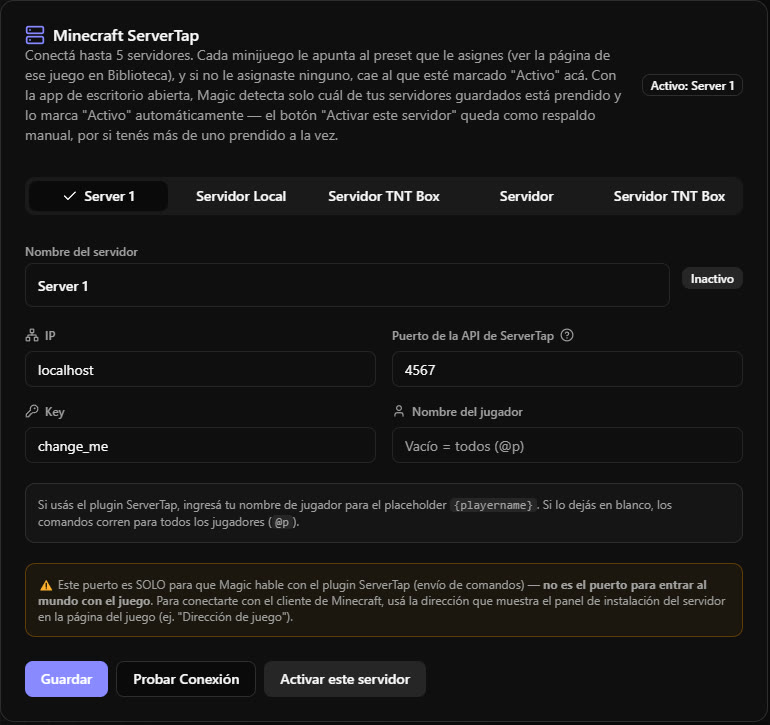
Minecraft servers connected to Magic
Minecraft server panel inside Magic
Installation

Questions while installing

Windows shows a warning when I open the installer

That's the usual SmartScreen notice for apps downloaded outside the Microsoft Store. Choose “More info” and then “Run anyway”. Always download from this site so you know it's the official installer.

Do I have to update by hand?

No. The app detects new versions and updates itself. If you want to force it, download the installer from here again.

Windows asked for network permission the first time

That's expected: Magic runs a small local service on your own PC to deliver the overlays to OBS without going through the internet. That service only listens on your machine.

Can I install it on more than one PC?

Yes, your account works on all of your computers. You can even aim Minecraft actions at one specific instance or at all of them at once.

What if I stream from my phone?

You use Magic Mobile, the native Android app. Same account, with its own profiles and its own separate subscription.
Download it and try it on your next LIVE

It takes minutes to get running, and from there your audience starts playing along with you.