Features Profile System Overlays Games Magic Mobile Pricing Español Sign in Download now
The full tour

Everything Magic does for your LIVE

From the moment someone sends a gift to the moment something happens on screen, in your game or on your server. Here's what's inside.

01 · Connection

Your whole LIVE comes through

Magic opens its own connection to your broadcast and reads everything happening inside it, not just the gifts. Every event arrives with who did it, how much they sent and in what context.

🎁
Gifts and combosWith the real combo count: 27 roses in a row are 27, not one.
❤️
LikesTallied per individual viewer, never mixed across people.
👤
Followers and Super FansWith the option to count each person only once per session.
💬
CommentsAny message, or only the ones containing your keyword.
😀
EmotesFan Club ones, Super Fan Club ones, or one specific emote from your catalog.
Fan ClubWhen a member levels up, with an optional minimum level.
🔁
Shares and joinsWho shares your LIVE and who walks into the room.
🎚️
And whatever you fire yourselfKeyboard shortcuts, a Stream Deck or an external webhook.
🛡️

A connection with a backup

If the main route drops, there are alternates ready to hold the session without you touching anything.

📇

Gift catalog

Pick the gift by name from TikTok's real catalog, with its diamond value — you never have to hunt down an ID.

📊

Metrics that stick around

Diamonds, gifts and donors from your broadcasts, plus the ranking of who carried the LIVE.

02 · Profile System

The engine: event → action

A Profile is a complete setup for your stream. Inside it you have Actions (what happens) and Events (when it happens). You keep several profiles saved and switch between them without reconnecting your LIVE.

Events: the trigger and its filters

🎯
An exact gift or a diamond minimumOnly the Rose summons zombies, or any gift worth 500+ diamonds calls the boss.
👥
A filter for who can fire itEveryone, followers, Fan Club members by level, moderators, donors by level, the session's Top N gifters, or one specific viewer.
🔢
Your own thresholdHow many likes or gifts it takes. With no threshold, a combo fires every single time.
1️⃣
Once per personSo nobody farms the same reward by unfollowing and following you again.
🎲
Fixed actions + one at randomThe event always runs the same ones and, on top of that, a different pick from a pool each time.

Actions: everything that can happen

Show an alertAny of the ones you designed in the editor, with their layers and animations.
🔊
Play audioFrom your library or uploaded on the spot.
🗣️
Read a text out loudNeural voices from different countries, with adjustable speed and volume.
🎮
Control a minigameEach game exposes its own actions and fields: which enemy, how many, on which team.
🧱
Run Minecraft commandsFrom the catalog or written by you, repeated N times at whatever interval you want.
🎡
Spin the RouletteThe on-screen roulette picks which action from the pool actually runs.
⏱️
Timer, goals and battleAdd or subtract time, pause, reset; add points to a team; push a goal forward.
🏆
Overlay countersAdd, subtract or set the wins shown on screen.
🔗
Call a webhookEven one on your own local network, which the cloud could never reach.
🔤

Variables everywhere

{username}, {giftName}, {repeatCount}, {diamondCount}, {comment}, {likeCount} — inside the alert text, the voice line, the command or the in-game message.

⌨️

A shortcut per action

Every action can have its own key. You fire it whenever you want, even with the app minimized while you're playing full screen.

🧪

Test without an audience

A test button on every action, and a simulator that injects fake events down the same path as the real ones.

03 · Alerts

Designed by you, layer by layer

The editor works like a video editor: layers, properties, entrance and exit animations, and a timeline to set the exact moment for each one.

🧱
Five layer typesText, image, video, audio and shapes — combined in the same alert.
🎞️
Animations with characterPop In, exaggerated Zoom, Swoosh, Glitch, Bouncing Drop, axis Flip, Vortex and more, each with its exit.
📐
A real timelineEntrance, delay and exit per layer, with zoom, snapping and a scrubber.
🟩
Chroma key for your videosKnock out the green background inside the editor, with adjustable similarity and blend.
🔀
VariantsDifferent versions of the same alert, and you choose which one is active.
🖥️
Several overlay screensSplit your alerts into separate channels and take each one to its own source in OBS.
↩️
Undo and redoExperiment without fear: you can always step back.
📚
Asset libraryVideo and image packs included, plus your own, ready to drag in.
04 · Overlays

Widgets that live off your LIVE

They're built on a vertical 1080×1920 canvas made for TikTok, saved as scenes and pasted into OBS with a single link. All of them feed off the real events.
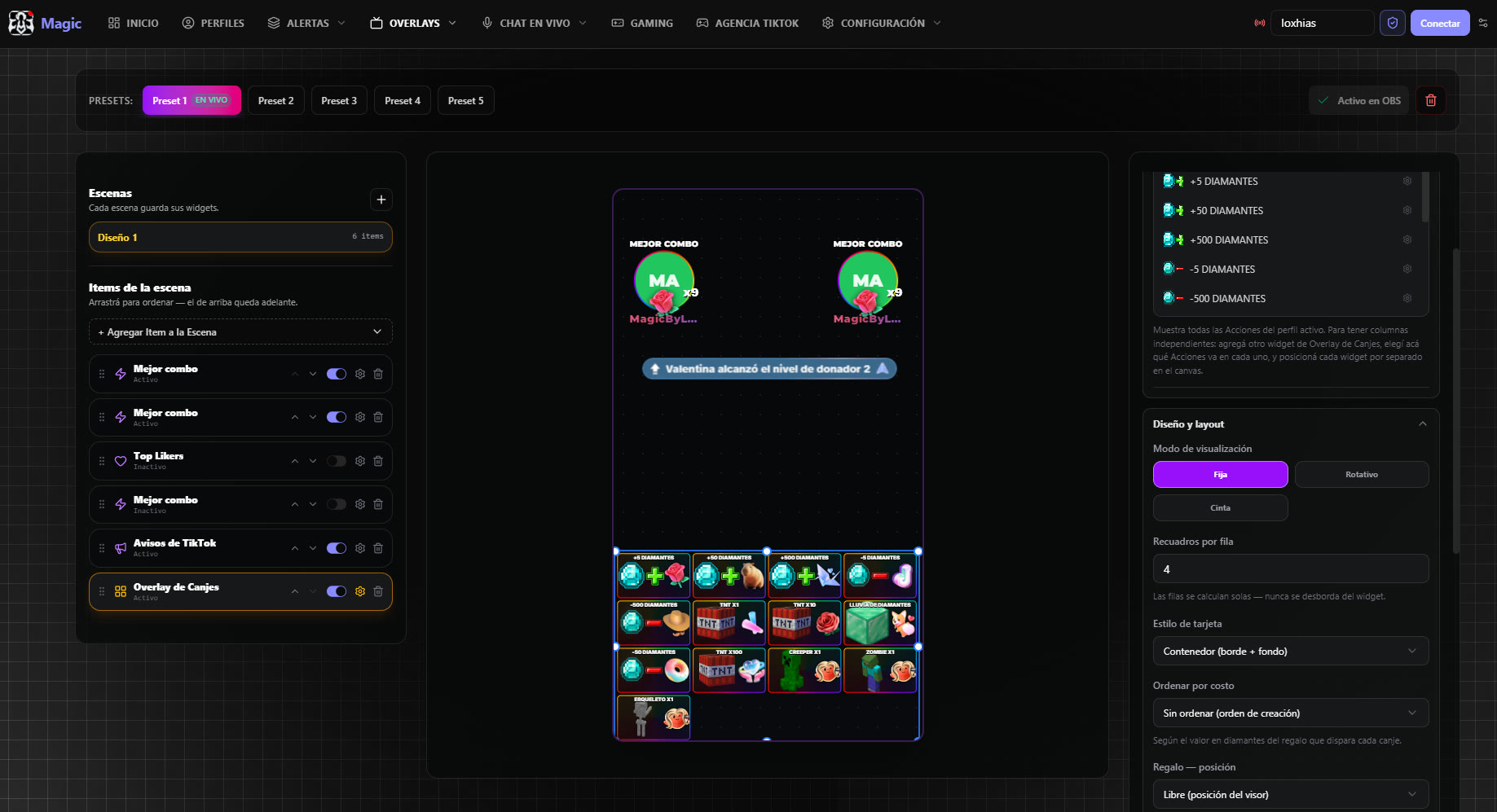
Overlay Editor — the scene you paste into OBS
Magic's Overlay Editor with the vertical scene and its widgets
💎
CountersSession diamonds and wins, with an optional goal. They rise from real gifts or from your actions.
🏆
RankingsTop donors and top likers, with medals and avatars, in classic, compact or podium style.
🎡
Animated rouletteIt spins on screen and the prize decides the action. You build the pool and each prize's weight.
🎫
Redeem overlayEach card is “this event → this action”, with its image and the gift that fires it.
🎁
Best gift and best comboThe biggest gift and the longest streak of the LIVE, always on screen.
📣
TikTok noticesWhen someone levels up as a donor or joins the club, it shows up on screen.
⏱️
Extensible timerA countdown that grows with the gifts, in two visual styles.
🎯
Goals and battlesA like goal on the real count, a team scoreboard and image goals.
💬
Live chat and voiceChat with avatars on screen, and the reader that speaks comments and gifts.
05 · Games and servers

Your audience plays along with you

Minigames running over your stream, a Minecraft server the app installs and boots for you, and even your Clash Royale matches with chat stepping in.

🖥️

Browser games

They go in as a browser source in OBS or TikTok LIVE Studio: copy a link and they appear over your stream. Nothing to install.

🧱

Managed Minecraft

The app downloads, installs and starts the server with our plugin, with a live console, configurable RAM and your own mod profile.

👑

Clash Royale and Roblox

Events land in the real match: cards summoned by your viewers, or events that change the Roblox server instantly.

06 · Control

Small things you feel while live

⌨️
Global shortcutsFire any action with a key, even while you're inside the game.
🎚️
Stream DeckA physical deck to launch alerts and actions without touching the app.
🖧
Several PCsPoint an action at one specific instance or at every one you have connected.
🌐
Spanish and EnglishThe whole interface switches language whenever you want.
💾
Explicit savingChanges apply when you decide, with a warning if you leave without saving.
🔄
Updates itselfWhen a new version ships, the app handles it.
🧭
Guided first stepsA starter checklist that takes you from connecting to your first overlay in OBS.
📱
And all of it on AndroidWith the mobile app, its own profiles and the engine running on the phone.

It makes more sense once you use it

The app downloads free: create your account, connect your LIVE and test the engine with the simulator before you go on air.